Filmustage Studio / vs Higgsfield Filmustage Studio vs Higgsfield Cinema StudioNov 2026

Find the mistake in the plan.
Not in the third take.

In Higgsfield you learn a shot is wrong after you have paid for it. In Filmustage Studio the scene is built in 3D first, so the room, the cast and the cameras are checked before any video is generated.

Cost

Checks cost nothing

The 3D plan and the frames are included. You approve the board, then pay for video once.

Time

No prompt per shot

The script breakdown briefs every shot. Nothing to tag, lock or re-describe for each angle.

Continuity

Same set, every camera

The reverse angle is the same room from the other side, because it is the same 3D set.

Scale

A script, not a clip

Scenes of any length, cut in an editor and joined into a film. Not 30 seconds at a time.

Higgsfield’s own worked example

Three takes
for one 20-second clip

Higgsfield published a consistency walkthrough: one character, one kitchen, five shots, 20 seconds at 1080p. Their note on the result: it “took 3 attempts”. This is that receipt, next to the same clip made from a plan.

Higgsfield Cinema Studio 4.0 · their numbers
Take 1 · 20 s at 1080p320 credits
Compare with the establishing shot by eye → driftdiscarded
Take 2 · 20 s at 1080p320 credits
Compare by eye again → driftdiscarded
Take 3 · 20 s at 1080p320 credits
Total for the take they kept960 credits ≈ $47

Two of three takes, 640 credits, were spent finding out what was wrong. Reference images for the elements are extra. Higgsfield’s article

Filmustage Studio · the same clip
3D plan of the kitchen, character and five cameras0 coins
Continuity checked in the plan0 coins
Five frames from the plan’s cameras0 coins
You approve the frames, or move a camera0 coins
Video · 20 s at 1080p900 coins
Total900 coins ≈ $44

Everything their takes were checking, light direction, objects, surfaces, the character, is decided before video. If one shot is still off, you re-shoot that shot, not the clip.

The honest arithmetic. A second of video costs more with us: 45 coins at 1080p against their 16 credits, on plans where $49 buys about 1,000 of either. It is the same video model on both sides, Seedance 2.5, so the difference is price, not quality. One of our takes costs about what three of theirs do. Their own example needed three; G2 reviewers describe the same pattern, one writing that a gaze error “means I have to regenerate the scene and use more credits”. The plan is what keeps you at one take, and it is where the hours go too: no establishing shot to make, no prompt to write per angle, no checklist per take.

The two methods

What you do
for every shot

The left column is Higgsfield’s published workflow. The right is ours.

Higgsfield Cinema Studio 4.0

The same references, every time

  1. Generate an establishing shot of the location, with no people in it.
  2. Save it as a Location element; save the character as a Character element, or train a Soul ID from 20 to 80 photos.
  3. For each angle, write a prompt with both @ tags, the action, the camera angle and the light.
  4. With two characters, add a count lock, a scale lock (“163 cm and 125 cm”) and a position lock to the prompt.
  5. Compare each result with the establishing shot by eye. If something drifts, name it in the next prompt or regenerate.
Filmustage Studio

One 3D set, every camera

  1. Upload the script, or describe the idea.
  2. The breakdown tags each scene’s cast, props, costumes and location; those become assets, made once.
  3. A 3D set is built per scene with the assets, a key light and cameras placed for coverage.
  4. Heights, positions and who holds what are facts of the set, and continuity is checked there.
  5. Frames, then video, are generated from the plan’s cameras and cut into the scene.
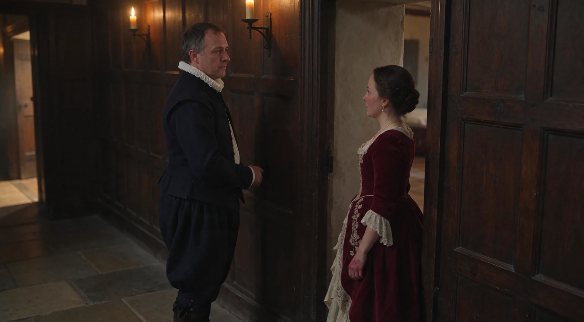
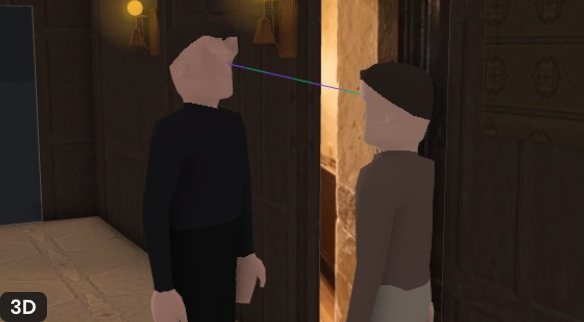
A generated shot in Filmustage Studio: Sir David Graham opens the door to Mary
Generated shotCamera 1, 46 mm, 1.7 m high
The same shot in the 3D plan, from the same camera
The same camera, in 3DThe set the shot was generated from
What Higgsfield says can go wrong

Four failures a 3D set
does not have

These are the failure modes Higgsfield’s own guides name, and what prevents each one in a plan.

Blending

“Both characters drift toward one average face”

Each character is a separate asset standing in a separate place in the set.

Swapping

Hair, outfits or props move between characters

The plan records who wears what and who holds what, per scene.

Scale

Characters trade heights between shots

Heights are dimensions of the stand-ins, not a line in a prompt.

Seasons

A design “can quietly drift from season one to season three”

Assets are shared across the project; episode 40 uses the same ones as episode 1.

Higgsfield has a 3D tool too, and it tells you something. 3D Jutsu builds a scene from a prompt with grey proxy geometry and stock Mixamo characters, and their consistency guide recommends it “for layouts that must match exactly”. It is a standalone workspace: it does not start from a script, your characters are added separately as references, and nothing checks continuity for you. In Filmustage Studio the 3D set is not a separate tool. It is built for every scene from the breakdown, with your cast and props already in it.

Failure modes: Higgsfield, two consistent characters in one scene and consistency across an animated series. 3D Jutsu: Higgsfield’s own description.

Side by side

The comparison

Higgsfield’s column comes from their product page, blog and launch release, plus one independent pricing review, as of November 2026.

 Higgsfield Cinema StudioFilmustage Studio
Starts fromA prompt and settings: genre, camera, pacing, castA script or an idea, broken down into scenes
How a character stays the sameCharacter element or Soul ID (20–80 photos), tagged in each promptAsset with fixed face and build, placed in each scene’s set; looks per scene
How a location stays the sameLocation element from an establishing image3D set built per scene, lit per scene
3D3D Jutsu: separate workspace, scene from a prompt, proxy geometryEvery scene, from the script, with your cast and props
CameraDescribed in the prompt, with # tags for movesPlaced in 3D: lens, height, tilt, heading, shown on every frame
Continuity checkManual, against the establishing shotIn the plan, before rendering
Review before paying for videoEach take is chargedFrames from the plan’s cameras, included
Fixing one bad shotEdit Video for part of a clip, or regenerateRe-shoot that shot with a note, or move its camera in 3D
Length30-second multi-shot scenes; longer pieces are split and joinedAny: shots per scene, scenes per film
Editing“No timeline, no post”Built-in editor, Full Cut, export to Premiere, Final Cut, DaVinci
Unused creditsReset at renewalRoll over while subscribed
Beyond the video—Breakdown, schedule, budget and call sheets from the same scenes
ModelsYou choose the engine per shot; access depends on the plan, and the $19 Starter plan excludes Seedance 2.5Always the current top models, chosen for you: Seedance 2.5 for video, Seedream 5.5 for frames and assets, on every plan
Price of a second of video3 credits at 480p, 7 at 720p, 16 at 1080p8 coins at 480p, 18 at 720p, 45 at 1080p
Resolution and soundNative 4K; speech, effects and music generated with the video480p draft, 720p, 1080p; voiced table read
Looks and effects50+ colour grades, camera bodies and lenses, eras, an emotion wheelStyle and direction by settings or voice
Existing footageExtend or edit uploaded video up to 30 sNot yet; creates from a script or idea

Pick Higgsfield if

  • You want one striking clip or a short montage, fast
  • You need native 4K, generated sound or a specific look
  • You have footage to extend or re-edit
  • You like directing by prompt and comparing takes

Pick Filmustage Studio if

  • You have a script, or more than a handful of shots
  • The same people, rooms and props have to hold for minutes, episodes or a feature
  • You want to approve frames before spending on video
  • You may shoot some of it for real

Sources: Higgsfield, How to Keep Characters and Locations Consistent Across AI Shots (workflow, Soul ID, worked example: 16 credits a second, 320 a take, 960 for three, about $47 at $49 per 1,000 credits); Cinema Studio product page (“No timeline, no post”, native 4K); Cinema Studio 4.0 launch release, 28 Oct 2026 (30-second scenes, 50 references, native audio, Edit Video, Extend); Aliteq, Cinema Studio 4.0: Features, Cost (credits per second, Seedance 2.5, Starter plan excludes it); Krea, a Higgsfield competitor, on credit expiry; G2 reviews (4.5/5 from 96 reviews; quote by Lauren H.). Higgsfield’s features and prices change often; check their site. Filmustage Studio figures are beta rates: 45 coins a second at 1080p, $49 per 1,000 coins. Higgsfield is a trademark of its owner; this page is not affiliated with or endorsed by Higgsfield.

Stop paying to find
the mistake.

Tell us what you are making and we will open Filmustage Studio on your account in one of the next groups.

Answers to
your questions

Filmustage Studio is in open beta

Try the beta
Is Filmustage Studio cheaper than Higgsfield?

Not per second: 45 coins at 1080p against about 16 credits, on plans where $49 buys roughly 1,000 of either. It is cheaper per finished scene when Higgsfield needs three or more takes, which is what their own published example took. The plan, the frames and the continuity check are included, so the checking happens before video.

How does the 3D plan save time?

It removes the per-shot work Higgsfield’s method needs: making an establishing shot, saving elements, writing a prompt with tags and locks for every angle, and comparing each take by eye. In Filmustage Studio the breakdown briefs the shots and the plan places the cameras.

Does Higgsfield have 3D?

Yes, a separate tool called 3D Jutsu that builds a scene from a prompt with proxy geometry and stock characters. It does not start from a script and does not check continuity. In Filmustage Studio every scene has a 3D set, built from the breakdown with your cast, props, cameras and light.

Can I use my own actor’s face in both?

Higgsfield trains a Soul ID from 20 to 80 photos, and screens every generation for real faces and protected content. In Filmustage Studio you attach photos and they become a character asset.

Which is better for a single ad or a social clip?

For one clip, Higgsfield is fast and has more looks, effects and generated sound. For a spot where the product has to match across six to ten shots and several versions, see Filmustage Studio for ads.

Is Filmustage Studio available?

Yes. The beta is live and open to everyone: sign in at app.filmustage.com and start your first project. Pricing is at beta rates for now.